View Issue Details
| ID | Project | Category | View Status | Date Submitted | Last Update |
|---|---|---|---|---|---|
| 0001409 | K18X001.00 SKB SWAN | SW Issue | public | 2021-12-14 09:45 | 2021-12-17 16:47 |
| Reporter | (ALTech) Wooshin Kang | Assigned To | Due Date | 2021-12-17 10:38 | |
| Priority | high | Severity | s2-severe | Reproducibility | always |
| Status | closed | Resolution | fixed | ||
| Summary | 0001409: HDR status API returns wrong value. | ||||
| Description | If user plug out -> in hdmi cable, hdr support status is changed. I have done test it on SAMSUNG TV. When i enter HDR menu, HDR is ON. After hot-plug, it is change to OFF. Please check below log. 12-14 08:17:29.751 8615 8675 D BtvService4.2.52 AVControlService: BTF|getHDRDisplaySupported|378|IN| DisplayOutput: try : getHDRDisplaySupported 12-14 08:17:29.751 8615 8675 D BtvJniInterface21.12.03: BTF|getHDRDisplaySupported|980|getHDRDisplaySupported 12-14 08:17:29.751 8615 8675 D BTVCORE-JNI: tvcoreJni_getHDRDisplaySupported start 12-14 08:17:29.752 465 2266 I SocControl.020: [getHDRDisplaySupported] called 12-14 08:17:29.752 465 2266 D Display.20.04.06: BTF|DISPLAY_HDR_GetSupported|2009|IN| display:ea8b7000 12-14 08:17:29.752 419 32477 I APM_AudioPolicyManager: [checkAndSetVolume] salmon outputDesc->setVolume (6048), volumeDb:-10.000000, device(1024) 12-14 08:17:29.752 419 32477 I APM::AudioOutputDescriptor: setVolume: salmon SwAudioOutputDescriptor::setVolume!! 12-14 08:17:29.752 419 32477 I APM::AudioOutputDescriptor: setVolume: salmon Volume::DbToAmpl(getCurVolume(vs))!! 12-14 08:17:29.752 419 32477 I APM::AudioOutputDescriptor: setVolume salmon stream=AUDIO_STREAM_ENFORCED_AUDIBLE , volumeAmpl = 0.316229, mIoHandle = 269 , delay = 0 12-14 08:17:29.752 465 2266 D Display.20.04.06: ++update_sink_caps AMP_DISP_OUT_HDMI_GetSinkCaps ret(0) 12-14 08:17:29.752 465 2266 D Display.20.04.06: ++update_sink_caps AMP_DISP_OUT_HDMI_GetSinkCaps mHdmiConnected(1) 12-14 08:17:29.752 465 2266 D Display.20.04.06: ++DISPLAY_HDR_GetSupported : support(0) 12-14 08:17:29.752 465 2266 I SocControl.020: [getHDRDisplaySupported] HDRDisplaySupported[false] 12-14 08:17:29.752 465 2266 I TVService-21.08.18: [TVService::getHDRDisplaySupported] ...ret(0) 12-14 08:17:29.753 8615 8675 D BtvService4.2.52 AVControlService: BTF|getHDRDisplaySupported|386|OUT| DisplayOutput: result : getHDRDisplaySupported : false | ||||
| Tags | No tags attached. | ||||
| Attach Tags | |||||
|
|
FYI, It is working correctly on EAGLE models. |
|
|
i have attached video for easily test. |
|
|
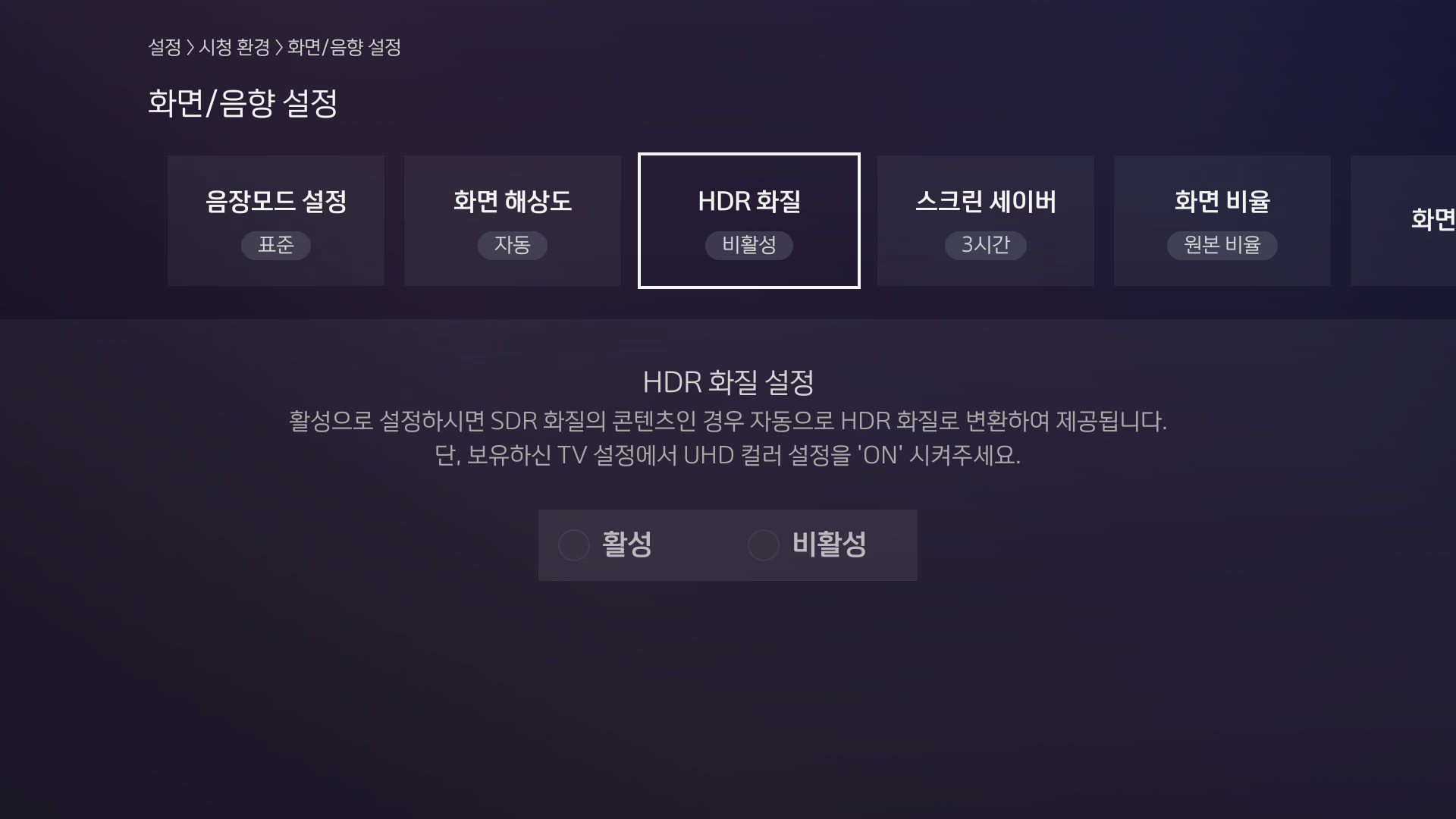
Hi Wooshin, I use V5.3.2_16 BMT SD image to test this issue. I can see "++DISPLAY_HDR_GetSupported : support(0)" after hotplug HDMI. But the UI HDR setting is different with your video. My UI will not have any focus on HDR settting as attached picture. Could you advise which version of image are you using for testing? |
|
|
Hi River, Please find HDR setting menu in your TV and you have set "HDR Enable" in TV first. And this issue will be control by SPTEK. So i close it now. Thanks. |
| Date Modified | Username | Field | Change |
|---|---|---|---|
| 2021-12-14 09:45 | (ALTech) Wooshin Kang | New Issue | |
| 2021-12-14 09:45 | (ALTech) Wooshin Kang | Status | new => assigned |
| 2021-12-14 09:45 | (ALTech) Wooshin Kang | Assigned To | => (SW) River Wong |
| 2021-12-14 09:48 | (ALTech) Wooshin Kang | Note Added: 0008912 | |
| 2021-12-14 10:11 | (ALTech) Wooshin Kang | File Added: IMG_4682.MOV | |
| 2021-12-14 10:11 | (ALTech) Wooshin Kang | Note Added: 0008913 | |
| 2021-12-14 15:38 |
|
File Added: no_focus.png | |
| 2021-12-14 15:38 |
|
Note Added: 0008918 | |
| 2021-12-17 16:47 | (ALTech) Wooshin Kang | Note Added: 0008945 | |
| 2021-12-17 16:47 | (ALTech) Wooshin Kang | Status | assigned => closed |
| 2021-12-17 16:47 | (ALTech) Wooshin Kang | Resolution | open => fixed |